


Director, Global Business Development Acquia
Collection
An Introduction to Drupal
Collection :
Most organizations — particularly those at the enterprise level — consider a content management system (CMS) a marketing technology stack necessity. A CMS stores content and publishes it to all digital channels. It also manages the content lifecycle, helping you plan, author, promote, evaluate, schedule, and maintain content in a single repository, streamlining workflows and saving time.
But choosing which CMS is right for your organization or switching to another CMS isn’t always straightforward. There are many to choose from, and what’s right for you depends on your business needs.
In this guide, we’ll look at Drupal, the CMS powering digital experiences for brands such as Nestle, Bayer, the Australian Open, Citibank, and Tesla. Learning about Drupal will explain why it continues to attract enthusiastic fans and why you should choose a CMS with proven staying power.
What is Drupal?
Drupal is a free, open source content management system written in the PHP programming language and distributed under the GNU General Public License (version 2 or later). Because Drupal is open source, users can run Drupal or modify it as they see fit. |
Organizations of all sizes — across industries and worldwide — use Drupal not only to build corporate websites but to build and manage e-commerce sites, mobile applications, digital signage, social networking sites, intranets, portals, microsites, resource directories, kiosks, and more.
Where does the name Drupal come from?
As an undergrad at the University of Antwerp, Dries Buytaert created Drupal as a message board in 2000, releasing it as an open source project a year later. This invited others to shape the platform to their needs and grow the Drupal community. Dries meant to introduce the software as “dorp,” the Dutch word for “village,” which got at the importance of community, a prevailing value of open source. He mistyped it as “drop.org,” though, which evolved to “Drupal” — because "druppel" is Dutch for the English word "drop."

Drupal took off in 2003, when supporters of U.S. presidential nominee Howard Dean created a digital platform that featured blogs, calendars, and forums that supporters used to establish advocacy groups. Although Dean dropped out of the race, his digital presence spotlighted the ways that Drupal could be customized and used at scale.
The software continued to gain traction among developers and enthusiasts, but it wasn’t until 2007, when MTV reached out to Dries, that he realized that he could create a company to support Drupal’s development. He partnered with Jay Batson that year to start Acquia. Today, Acquia is the top corporate contributor to Drupal development.
What is Drupal used for?
Like any CMS, Drupal helps users structure and manage their content. People can use it to build websites or web applications, as well as integrate it with many third-party sites and services. Today, Drupal has more than 51,000 modules that extend its functionality in areas such as content scheduling, auto URL aliasing, and tokenization. There are also hundreds of integrations for applications like Mailchimp, Apache Solr, and the Salesforce suite.
Examples of its use can be found throughout the web, where Drupal powers more than 1.7 million websites. In fact, of the top 10,000 websites, roughly 10% are built on Drupal. They appear in all sectors, including:
- Entertainment (Sega, Warner Music Group)
- Financial services (Fannie Mae, Nasdaq)
- Food and beverage (DAVIDsTEA, Hennessy, Perrier, Sodexo)
- Government (City of London, Government of Australia, Government of India, Government of South Africa, U.S. Internal Revenue Service)
- High tech and telecom (AMD, IBM, Panasonic, Verizon, Vodafone)
- Higher education (Princeton University, University of Oxford, University of Toronto)
- Manufacturing (Fuji Film, Lamborghini)
- Media and publishing (Economist.com, India Today, NBCUniversal)
- Nonprofits and NGOs (Doctors Without Borders, Musée d'Orsay, Oxfam, UNESCO)
- Pharmaceutical and chemicals (Bayer, Boehringer-Ingelheim, Novartis, Pfizer, Solvay)
- Travel and hospitality (Centara Hotels & Resorts, Japan Airlines)
- Retail (Arc’teryx, Canada Goose, J.Crew, JD.com, Vera Bradley)
Who makes up the Drupal community?
People across industries champion Drupal, with fans including digital experience designers, content strategists, editors, developers, and other technologists. Following are the groups that most often touch the software. Let’s learn why they’re drawn to the CMS.
Developers
While any new technology comes with a learning curve, Drupal has a legion of loyalists ranging from developers to marketers to tech hobbyists and beyond. The point is, the enthusiasm is there and still going strong. Here are a few key reasons:
- Open source community: Drupal developers and hobbyists benefit from the expertise, creativity, and long-time dedication of its large, global, and vibrant open source community. The Drupal community numbers more than 1 million members, with over 10,000 actively contributing to Drupal development. The community can innovate, patch bugs, and create integrations faster than any one company. Such a large group of contributors also means Drupal can provide greater testing coverage to ensure higher stability across a diverse range of applications, industries, languages, and cultures. The community meets up during DrupalCon (held twice a year), at Drupal Camps, and other events to collaborate on development roadmaps and more.
- Open source code: Drupal’s openness also means users are never locked in. They can modify code under the terms of the GNU GPL. They can also take their code anywhere and are free to use other marketing technology alongside Drupal. Because Drupal is open, teams can experiment and pivot as business needs change.
- Modular: Instead of building custom features or themes from scratch, developers can take advantage of 3,000+ themes for changing a site’s appearance and 51,000+ modules for extending Drupal’s functionality in areas such as form creation, personalization, customer relationship management (CRM), commerce, cookie management, social media marketing, analytics, and more. Such freedom allows developers to tailor digital experiences as they wish, serving them across a range of channels, formats, and contexts. Modularity is an afterthought with most other CMSs, but Drupal is modular by design.
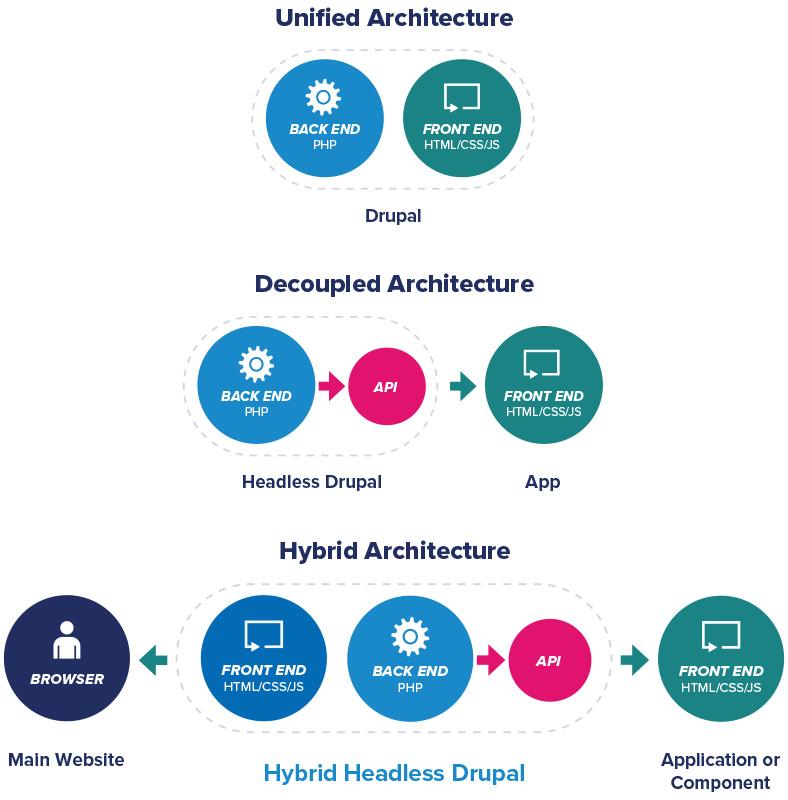
- Composable architecture: Drupal’s architecture — which can be traditional, headless, or hybrid — gives web development teams the flexibility to deliver content across all touchpoints. Drupal enables teams to support hundreds or even thousands of applications from a single codebase and to create dynamic or static sites, as well as simple or complex applications.
- Advanced tooling: Drupal builds are assembled with Composer, the popular PHP package dependency manager. The Symfony framework also provides key components for Drupal's object-oriented architecture, which then enables powerful, unique features, like an advanced caching API and world-class taxonomy support.
- World-class security: Drupal has a dedicated security team and benefits from the Drupal Steward program, a service that quickly addresses critical vulnerabilities. Indeed, security is one of the reasons Drupal is trusted by government agencies worldwide. There are also thousands of developers who volunteer their time and expertise monitoring Drupal’s code, so there are constantly eyes on the software.
Marketers
Most marketers are familiar with content management systems, which share many of the same core features. The attraction to Drupal, then, is something more.
- Autonomy to build digital experiences: Marketers can use integration, pre-built configurations, and simple page building tools (known as WYSIWYG or no-code tools) to create digital experiences that meet the precise needs of their customers, employees, constituents, or other audiences. Content can be rapidly assembled based on the interests of each customer, employee, or constituent — all as marketers desire.
- Decreased reliance on developer teams: With other content management systems, marketers rely on web development teams to build or customize digital experiences by doing things like creating custom layouts. This can add time to marketing timelines and divert a development team’s time from other strategic priorities.
- Composable content: In Drupal, everything is reusable, meaning content authors and marketers don’t need to waste time repeating themselves. Instead, they can easily reuse component content types like blocks, fields, and media across all channels and applications — updating content types once and populating changes everywhere.
- Extensive marketing technology integrations: Drupal’s ability to integrate with many of today’s marketing technology (martech) tools, including marketing automation platforms, helps marketing teams reach customers across digital channels.
- Drag-and-drop layout builder: This functionality enables users to create front-end layouts much more easily. Content editors can add components to pages, as well as pages to their websites — all without having to write a lick of code.
- Accessibility: The Drupal community strives to make Drupal accessible by default. Features that support accessibility are typically enabled by default, helping organizations reach the widest possible audience when building web applications. Drupal Core features align with guidelines provided by the World Wide Web Consortium’s Web Accessibility Initiative, and Drupal has adhered to Web Content Accessibility Guidelines 2.0 AA for more than a decade. The Drupal community leverages testing tools to check for common accessibility issues and relies on its thousands of active members to manually test. Finally, Drupal supports many widely used assistive technologies like text-to-speech and speech-to-text tools, hardware inputs such as keyboards and switch devices, screen magnification tools, and browser extensions.
- Multilingual management: Drupal’s UI is translated into 94 languages, supporting a user-friendly experience for content authors. Additional capabilities include multilingual sitemaps to support SEO and support for visualizing translations to make site-building easier.
- Search engine optimization (SEO) support: To excel in SEO, websites need to load quickly and be mobile-friendly. Drupal has both on lock: its BigPipe module, which is in Drupal Core (the foundational code for Drupal), sends cached content first and streams personalized content as it’s rendered. Drupal sites come with a sitemap of the site’s most important pages for search engines to crawl and understand page hierarchy. Plus, it automatically adds structured metadata tags to each site to increase search engine visibility. And when it’s time for change and pages become outdated, Drupal sites allow content maintainers to create redirects to preserve SEO rankings.
CMOs and CIOs
All the Drupal advantages enjoyed by marketing, IT, and development teams accrue to their CMOs and CIOs, who naturally benefit from increased staff collaboration and productivity. There are other gains, though, of particular importance to the C-suite:
- Performance and scalability: The more traffic to your website, the better — unless the site goes down. Many of the biggest sites in the world run on Drupal to take advantage of features like:
- Powerful caching with fine-grained cache clearing
- BigPipe support for scaling personalized content
- Horizontal scaling to dozens of servers
- Content delivery network (CDN) integrations for global availability
- Multi-region failover support for high-availability
- Optimized HTML generation supporting CSS/JS aggregation, lazy image loading, and modern image formats.
- Support for the composable enterprise: Drupal supports composable architecture and composable content strategies — key to many organizations’ vision of the composable enterprise. By making everything open and reusable, Drupal supports digital experiences at scale and across all digital touchpoints, ensuring that one update populates everywhere. The result? Higher quality, better accuracy, easier addition of new customer touchpoints, and more.
- Faster time to market: Low-code tools empower marketers and developers to launch Drupal sites quicker. That speed matters when organizations are competing for the attention of audiences who consume content all day, every day across devices and channels. Being first out of the gate with content and products can be a distinct advantage.
How Drupal compares to other content management systems
Many CMSs fall into three general types: open source, proprietary, and software as a service (SaaS). Each can be a good choice, depending on an organization’s needs and digital experience strategy.
Open source CMSs like Drupal are free or low cost and can typically scale with the business. Proprietary products such as Adobe Experience Manager (AEM) or Sitecore can lock customers into long-term agreements and are often sold as one element of a monolithic digital experience platform (DXP). SaaS CMSs are typically available via a subscription model.
Each CMS can have one of three architectures: traditional, headless, and hybrid.
- Traditional: In this architecture, the back and front ends of a CMS are tightly knit. Content created on the back end is then published to a front-end rendering layer connected to the CMS. This architecture is great for organizations that only plan to publish content to a website, but fewer and fewer such organizations exist, given the plethora of digital channels available.
- Headless: This architecture uses API endpoints to deliver content to multiple channels; it has no front-end presentation layer. Because of that, developers are responsible for presenting the content via the front-end framework of their choosing. Mid-sized and enterprise businesses find headless CMSs a good fit for deploying content across a wide range of channels, such as digital signage, kiosks, smart devices, and more.
- Hybrid: A hybrid architecture pulls the best from traditional and headless frameworks. Users build content via an editing interface; the content is then stored in the CMS. When it’s ready for deployment, users send it to the front end of their choice — website, mobile app, and so on — via a built-in front end or APIs.
Adobe Experience Manager
With these fundamentals established, let’s double click into a few CMSs on the market today to get a sense of what’s out there, beginning with AEM. You’ve likely heard of Adobe and its suite of many products. Adobe Experience Manager Sites (AEM Sites), while included in the suite, is the company’s CMS offering, providing both traditional and headless CMS capabilities.
If you’re considering Adobe, be wary of high costs, long implementation times, and steep learning curves for new users. Remember that proprietary solutions (i.e., those that aren’t open source) lead to vendor lock-in and limit your flexibility to adapt your CMS to shifting business needs. Most organizations that see success with AEM are large, global organizations that have made investments across the entire Adobe ecosystem.
Sitecore
Next, there’s Sitecore, a DXP monolith offering two core packages: Experience Manager (XM) and Experience Platform (XP). XM is Sitecore’s CMS-only offering, while XP is its DXP solution. XM offers strong CMS capabilities in content taxonomy, community management, and SEO support.
However, Sitecore’s legacy offering stitches together point-solutions, which creates a disconnected and inconsistent customer experience across all channels. The company also relies on third-party providers to deploy its solution in the cloud, leading to additional costs for cloud deployment. For customers looking for a CMS with a cloud offering, Sitecore may not be the strongest choice. It may be a better fit for companies in verticals like retail, travel, and financial services that are looking to invest in an entire DXP.
Contentful
For those considering headless-only CMS solutions, Contentful is an API-first CMS and a member of the MACH Alliance. It provides the agility of content delivery across any channel — current or emerging — to engage with customers across multiple touchpoints through API endpoints. This CMS type focuses on API-only methods for delivering headless and decoupled CMS solutions.
However, while that approach may appear to unlock all the freedoms that a traditional model lacks, organizations also face unique challenges when implementing a headless-only approach, particularly around enabling business users to create and update content autonomously. Forrester confirms this challenge, observing that Contentful has focused heavily on developer personas and struggles to deliver a holistic and full-fledged practitioner program. This approach can lead to additional investments in low-code site building tools to support business users’ needs and workflows. Contentful is a good fit for mid-market organizations with experienced development teams looking for a headless-first architecture.
Drupal
Drupal is the leading open source, enterprise-grade CMS. It offers flexibility for modern app development: traditional, headless, or hybrid architectures; dynamic to static sites; and simple to complex digital portfolios. It enables users across teams — marketers and developers — to harness the power of Drupal to fuel digital experiences across any and all customer touchpoints. With an API-first foundation and extensive martech integrations, organizations can deliver a solid digital portfolio today while simultaneously ensuring that it’s future-ready.
Drupal sits at the heart of world-class digital experiences including corporate websites, e-commerce sites, event pages, microsites, mobile apps, digital signage, portals, and more. Drupal security is extensive, guaranteeing uptime and performance, no matter the traffic.
Getting started with Drupal
The Drupal community and Drupal’s ability to support the most demanding web applications means anyone selecting it as their CMS will be well supported today and into the future. Certainly, developers, marketers, and executives enjoy the numerous advantages that make it the best open source CMS available. Learn more to begin your Drupal journey.

